
Menu-bar app · macOS · Windows · Linux
Spotify in 432 Hz. Without converting a single file.
Netflix, YouTube, your own player just the same. The Tuner sits in the system audio — not in the file.
Nobody knows whether you hear the difference. We don’t either. Least of all us. So: one slider, your ear, a quiet hour.
The proof · no download needed
Music on, then drag from 440 to 432.
The processing core cannot be loaded in this browser — the demo stays silent.
Chopin, Nocturne op. 9 no. 2 — public domain. It is retuned here by the same signal core that sits in the Tuner, and at its best setting: the pitch moves, the tempo stays put. That is why it says 100 %, wherever you drag. The display assumes the recording sits at 440 — the Tuner on your own machine does not assume, it measures.
 Download Tuner for macOS
DMG · 2.0 MB · macOS 14.4 and up · no account · test build until 31 Oct 2026
Download Converter for macOS
DMG · 3.0 MB · macOS 14.4 and up · retunes music files for good
Download Tuner for macOS
DMG · 2.0 MB · macOS 14.4 and up · no account · test build until 31 Oct 2026
Download Converter for macOS
DMG · 3.0 MB · macOS 14.4 and up · retunes music files for good
 Download Tuner for Windows
EXE · 69.8 MB · Windows 11 · early version, not yet signed
Download Tuner for Windows
EXE · 69.8 MB · Windows 11 · early version, not yet signed
 Download Tuner for Linux
DEB · 1.7 MB · Debian 13 with PipeWire · early version
Download Tuner for Linux
DEB · 1.7 MB · Debian 13 with PipeWire · early version
On a phone, no app hands out the sound of Spotify or Netflix.
And your own music?
Drop a file into the window and find out what concert pitch it really sits on. Free, no account — and the file never leaves your machine, the maths runs in your browser.
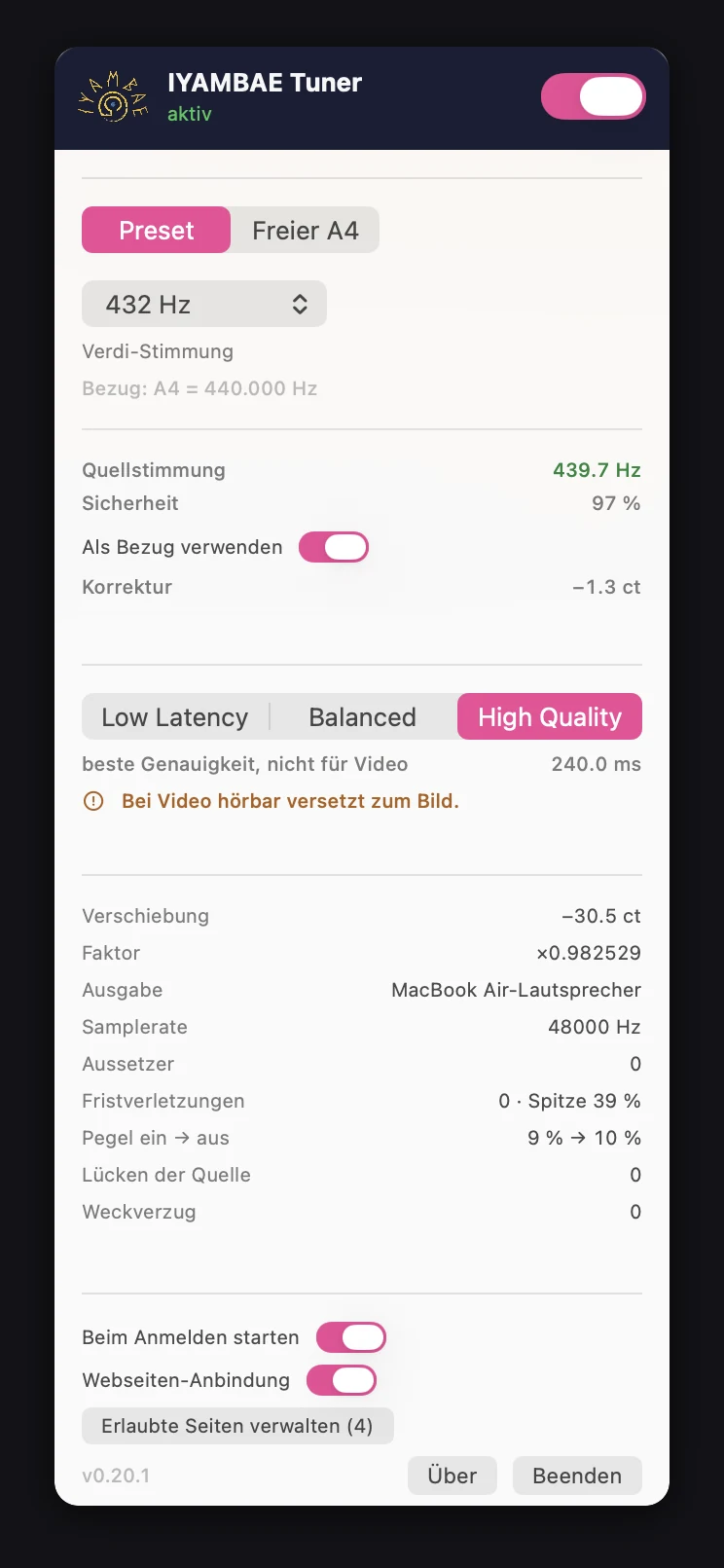
This is how it looks
What it does
System-wide
The sound passes through the Tuner before it reaches the speakers. On macOS, Windows and Linux.
Every app
Spotify, YouTube, Netflix, your own player. The Tuner sees the finished sound, not the file.
No converting
Nothing is converted, nothing is stored. The tempo stays as it is.
Verifiable
No voices, no stars. Measurements only.
Verifiable
No voices, no stars. Measurements only.
There is not one single user yet — so we quote none. What there is: numbers from the build and from the measurement. They stand here together with why they count.
- 11 ms latency with the fast engine That is the line between “works with video” and “doesn’t”: the sound stays on the lips. If you would rather have the better sound than the sync, switch to the good engine — 240 ms, useless with picture.
- 0 allocations in the real-time path Not claimed, checked: the build script takes the finished library apart and lists every call that leads out of the real-time path. There are none. No memory, no lock — and so nothing that can click in the middle of a track.
- 88 tests, 436 assertions, zero failures Built on macOS 26 with Xcode 26.6. The number stands here because it comes about anew with every build — it is not a badge, it is a measurement taken today.
- 432.33 Hz measured — three systems, one result 440 Hz in, target 432: out come 432.33 Hz with the fast engine and 432.09 Hz with the good one. On macOS, on Linux and on Windows. Spread between them: 0.01 cents.
- 0.09 % of one processor core That is 1077 times real time. The fan does not notice anything is running, and neither does the battery — so there is no reason to switch the Tuner off in between.
- 0 requests to other people’s servers This page loads nothing from elsewhere: no font from Google, no analytics, no cookie. The Tuner asks for no account, no email address and sends nothing away. You download a file, and that is that.
- detected
- 443.1 Hz
- shift
- −43.9 cents
- engine
- delay line · 11 ms
Test release · free · no account · macOS 0.29.0 · Windows 0.3.0 · Linux 0.3.0
Go and get it. Then three steps.
On a phone it doesn’t work. Here is why.
Test release · free · no account · macOS 0.29.0 · Windows 0.3.0 · Linux 0.3.0
Go and get it. Then three steps.
On a phone it doesn’t work. Here is why.
The app itself: menu bar, takes the system audio and replaces it. The first time you switch it on, macOS asks for “record system audio”.
Tray icon: pitches under their names, on and off, output device, start at login. Underneath, a plugin works in PipeWire’s filter chain. Early version.
On some systems a double-click is enough; on a bare Debian you need sudo apt install ./iyambae-tuner_0.3.0-1_amd64.deb. Under GNOME the icon needs the AppIndicator extension.
Its own window, tray icon, installer. Installs without administrator rights — no UAC prompt, no password. Early version.
Not yet signed: SmartScreen warns on first launch. Click “More info”, then “Run anyway”.
What happens next — on the Mac
Open the DMG, drag the app into “Applications”, double-click.
No workaround needed. Both apps are signed and notarised by Apple — no warning and no “Open Anyway”, even offline.
The first time you switch it on, macOS asks for “record system audio”. From then on the Tuner starts like any other app.
Before you start it
Built and checked — 88 tests, 436 assertions, zero failures on macOS 26 — but not yet used by a human being in everyday life. That is the honest state of a test release.
The file carries its SHA-256 sum. Check it instead of believing us: shasum -a 256 on the Mac.
Four questions
What should we build next?
Four questions
What should we build next?
We would rather not guess. Four questions, no sign-up, no address — none of it can be traced back to you. One minute.
How do you listen at 432 Hz today?
If at all — “not at all” is a valid answer.
What do you miss most?
The thing you keep running into.
Have you ever paid for 432 Hz software?
Asking what was — not what would be. Memories hold up better than intentions.
What would you build, if you could?
Optional. The sentence that helps us most is usually right here.
Thank you.
This feeds into the decision about what gets built next.
No problem — that is an answer too.
It did not arrive, unfortunately — the service is not responding right now. If you like, write to us via the contact details in the legal notice.
If you ask
Everything else, folded away.
If you ask
Everything else, folded away.
There for whoever asks. Out of the way for whoever wants to download.
What is 432 Hz anyway?
A concert pitch. It fixes where A4 sits, and everything else follows from it. The standard says 440 Hz; 432 Hz lies eight hertz below that, which is −31.77 cents, or just under a third of a semitone.
The Tuner shifts the whole sound by exactly that distance. It does not pick out single notes, and it changes nothing about the music except its pitch.
So where does 440 Hz come from?
From an agreement, not from nature. When Alexander J. Ellis gathered five hundred years of European tuning pitches in 1885, his table ran from 373 to 567 Hz — more than a fifth of spread. The reason was banal: organ pipes were built to the local measure of length, and the “foot” in France was not the “foot” in Saxony. Between the Paris tuning fork of 1826 at 431.7 Hz and the one of 1855 at 449 Hz lie twenty-nine years — and the same city.
440 comes from 1834, proposed by Johann Heinrich Scheibler, a silk manufacturer from Krefeld. His reason was as unspectacular as it gets: 440 was the mean around which Viennese pianos drifted between warmth and cold. The conference that turned it into a world standard in 1939 met at BBC headquarters and preferred 440 to 439 because 439 is a prime number and could not be produced from the BBC’s quartz oscillator by chains of dividers.
Detail · 430 to 450 Hz this is where it all happens today
- 415Historically informed performance — exactly one semitone lower
- 432Milan 1881 — Verdi first favoured 435, later 432; what mattered more to him was a single common pitch
- 435Diapason normal, Paris 1859
- 440Scheibler 1834 · London 1939 · ISO 16
- 443common in many orchestras today
- 445Berlin Philharmonic under Karajan
- 449Paris tuning fork 1855
- 470–480Highland bagpipe
“A piece of childishness that would almost lay itself open to ridicule.”
And what about the effect?
Many claims circulate about the effect of 432 Hz. There is no scientific consensus — which is why you will find no such promises here. We sell you a sound tool, not a remedy.
What has been studied so far is on the page for parents, with all its limitations — read it there rather than take our word. And then listen: the only measurement that counts for you is the one you make with your own ears.
And what if it is only placebo?
Perhaps it is placebo. That is no objection to listening — it is the reason we put the blind test in front of you instead of telling you what you feel. If it comes out against us, it says so.
And even then: an evening you experienced as calm was a calm evening. Whether that was down to the music or to your having taken an hour for yourself, we cannot say — and neither is worth less than the other. We simply do not sell you the one as the other.
Does digital lose the wave?
A widespread picture shows a smooth wave on the left and a staircase on the right. Almost everyone reads it as: digital is jagged. The picture is correct — it just doesn’t show the end.
The staircase is the intermediate form. On playback a filter sits behind the converter, and it turns the points back into a continuous curve. Below the limit frequency there is exactly one smooth curve through those points.
What digital really loses is smaller and duller: a noise floor from the rounding, at 16 bit some 96 decibels below the signal — quieter than the surface noise of any record. Add filter ringing and jitter, audible only in badly built gear.
We write this even though it contradicts our own feeling. Anyone who says vinyl sounds different is right — it just isn’t the staircase. It is the cut, the distortion that breathes with the music, and the fact that you can’t play a record in passing.
Is this a medical device?
No. The IYAMBAE Tuner is not a medical device, not a remedy and not a therapeutic instrument. It is a tool that shifts pitch.
It is not intended to detect, treat or alleviate any illness, and we claim that nowhere. If something is wrong with you, see a doctor.
What about 528 Hz and the Solfeggio frequencies?
528 Hz is not a concert pitch but a single note — roughly a C5. A concert pitch fixes A4, and everything else follows from it. The Tuner shifts the whole sound by an interval; it does not set a single note.
It can still be worked out: if you want your C5 at 528 Hz, you set A4 to 444.0 Hz — the slider can do that. At A4 = 432 Hz the same C5 sits at about 513.7 Hz.
An effect of the Solfeggio series is not proven — so we claim none. Where the numbers come from, a book from 1999, is on the Solfeggio page.
Which systems are supported?
macOS 14.4 and up — the complete app in the menu bar. Windows 11 — its own window and tray icon; system audio is captured via WASAPI. Linux with PipeWire 0.3.60 and up — tray icon: pitches under their names, on and off, choice of engine, output device, start at login. Underneath, a LADSPA plugin works in the filter chain. Built for Debian 13.
Under GNOME the tray icon needs the AppIndicator extension once. The package recommends it, and the program says so at startup — instead of staying invisible and leaving the impression that nothing had been installed.
Windows and Linux are early versions. They retune system audio and detect the source’s tuning like the Mac app, but have seen less use. On Linux the frequency is shown in the menu, not in the icon. The Windows version is not yet signed — SmartScreen warns on first launch.
Why not iOS or Android?
Because that is where the sandbox draws its line, not where the effort runs out. On iOS there is no counterpart in any form. On Android you may only capture someone else’s audio if the playing app permits it — and Spotify, Netflix and YouTube do not.
What would be possible is something else: a player of our own that takes the music in hand itself. That is being thought about.
Why an app and not simply a website?
Because a website has to guess and the app can measure. A page in the browser assumes the recording lies at 440 Hz, calculates the fixed factor 432⁄440 and applies it to everything. With a recording that lies at 443 — a value many orchestras play — you end up at 435 instead of 432.
The Tuner determines the actual tuning of the running sound and works out the distance to the target from that. What lies at 443 is shifted 443 → 432, not 440 → 432. And it reaches the system audio, not just one tab.
- 1.85 %That is how far the time-stretch factor is from unity. For an octave it would be 50 %.
- ±0 %The tempo stays. Simply playing back more slowly would turn 120 BPM into 117.8.
- 0.09 %of one core with the fast engine — 1077 times real time, measured on Windows.
- 0allocations in the real-time callback. Not claimed: the build script takes the DLL apart and lists every call that leads out. There are none.
How much latency does it cost?
Shifting pitch without touching tempo costs time — and how much depends on the method. You choose.
- 11 msDelay line. Fast enough for video and for playing along. The sound stays on the lips.
- 240 msHigh Quality (Signalsmith). Sounds better, but is useless with video — a quarter of a second of offset is visible.
The switch crossfades over 25 ms so that the change does not click.
What has this got to do with the radio?
If the Tuner is running on the same computer, IYAMBAE Radio can notice it and switch off its own guessing retune. Then the app that measures takes over.
You are asked twice in the process: the page asks once, and the Tuner asks you. Without your consent no website learns that you are using it — not even that it is installed. A list of permitted websites in the program code would have been more convenient. It would only have answered the wrong question.
What does it cost?
This test release costs nothing. It asks for no account, no email address and no payment details — you download a file, and that is that.
The prices for the finished versions are set, each a one-time payment with no subscription: the Tuner 29 €, the Converter 38 €, both together 55 €. Selling here is planned — until then the test release stays free.
What happens to my data?
This page sets no cookies, measures nothing and loads nothing from other people’s servers. The fonts sit on the same server as the page — a link to a font collection in the USA would send your IP address there before you had clicked on anything.
The Tuner needs no account and sends nothing away. It processes the sound on the computer itself and records it nowhere. The only interface to the outside is the service for the radio on 127.0.0.1 — it does not leave your computer and answers only if you allow it.
The details are in the privacy policy.
The Converter has its own privacy policy.
To get your bearings
Three ways to 432 Hz.
To get your bearings
Three ways to 432 Hz.
There are three ways to enjoy 432 Hz. They do not exclude each other — they answer different questions.
1 The Tuner — system-wide
Computers only. Every app, every service, without touching a single file.
Where we stand: signed and notarised by Apple for macOS, and ready to download for Windows and Linux too. It cannot go into the App Store — it sits too deep in the system for that. Through this site it can.
2 Players that convert as they play
With any DRM-free source, on the phone too. The catch: you have to own the music and have it stored somewhere.
For radio, iyambae.fm covers that need for now. Our own player is planned — but only once we know what we can do differently and better.
3 Converters — retuning files for good
Only with DRM-free material, and honestly only worth it for “lossless”: .flac or .wav.
What was once heavily compressed would have to be compressed a second time when converted. The IYAMBAE Converter doesn’t do that: it also takes MP3 or AAC, but saves the result losslessly as FLAC. The sound is recalculated once — but not compressed a second time. That is the difference.
The Tuner and the Converter are here, and so is the website. After the test phase we will offer the software at a fair price. It is time everyone had the freedom to hear music in the tuning they chose themselves. If that isn’t possible in daily life — telephones, doorbells, church bells, sirens, shop music — then at least on your own devices.
Other people’s sources
What others write about it.
Other people’s sources
What others write about it.
Other people’s pages, passed on without assessment. We do not adopt their content as our own; their operators are responsible for it. Accessed on 21 August 2026.
-
de.wikipedia.org
Kammerton
Encyclopaedia article on the history of tuning pitch.
-
en.wikipedia.org
A440 (pitch standard)
English-language article on the 440 Hz standard.
-
roelhollander.eu
Roel’s World — 432 Tuning
Extensive private collection on pitch history and practice.